What is Nodaform? Measured floor plans in your browser.
Nodaform is a web app where you draw the floor plan of your home or workplace at its real dimensions. No install; it opens in the browser on a computer, a tablet or a phone turned sideways. On this page we briefly explain why we built it, how it's run and what we promise you.
Why Nodaform exists: measured plans without knowing CAD
Drawing a measured floor plan usually takes either knowing a CAD program or paper, pencil and patience. Yet someone moving house, discussing a renovation, preparing a listing or sketching a first draft usually needs the same things: the rooms' real dimensions, which way the door opens, whether the furniture fits.
Nodaform's aim is to make that easy in the browser. For anyone who needs professional drawings, the same plan also gives you sheets Plus, DXF Pro and IFC ULTIMATE.
- You type a room's interior dimensions and the walls are added outside.
- Furniture comes from the library at its real size; you change the dimensions to match your own pieces.
- 3D, sections, elevations and sheets from the same project (sections, elevations and sheets Plus): change one and the others change too.
How Nodaform is run: payments, data and support
The things you'll want to know before paying or opening a team account, in one list. The details are in the legal documents; here's the short version.
For details of the person providing the service, see the KVKK Privacy Notice and the Terms of Use; for payments, see the Distance Sales and Cancellation and Refunds pages.
- Operator
- Sole proprietorship. The details of the person who provides the service and is the controller of your personal data are in the KVKK Privacy Notice and the Terms of Use.
- Payment and invoices
- Paddle is the seller for all orders (Merchant of Record): it collects the payment, issues the invoice and handles refunds. Your card details stay with Paddle; we never see them.
- Prices
- In your region's currency: ₺ · € · £ · $. The total including taxes is shown in the checkout before you confirm.
- Your projects
- On our servers on Cloudflare infrastructure, together with your account. When you delete your account, your projects and shares are deleted too.
- Sharing
- Only with the email address you invite. Whoever signs in with that address opens the plan; there are no public links.
- AI assistant
- The prompt you write to the assistant and the image sent for a render go to the provider only to produce the response, and aren't stored by us; for the monthly allowance, only usage counts are kept.
- Support
- info@nodaform.com, My account › Support, or the Report a bug button in the editor. You're notified by email when a reply arrives.
- Updates
- What was added to the editor in each version is listed on the Release notes page.
- Languages
- 12 languages, each with its own URL; emails come in your account's language.
What we promise at Nodaform
Six principles; each one is a concrete rule with a counterpart in the editor or the legal documents.
Text matches reality
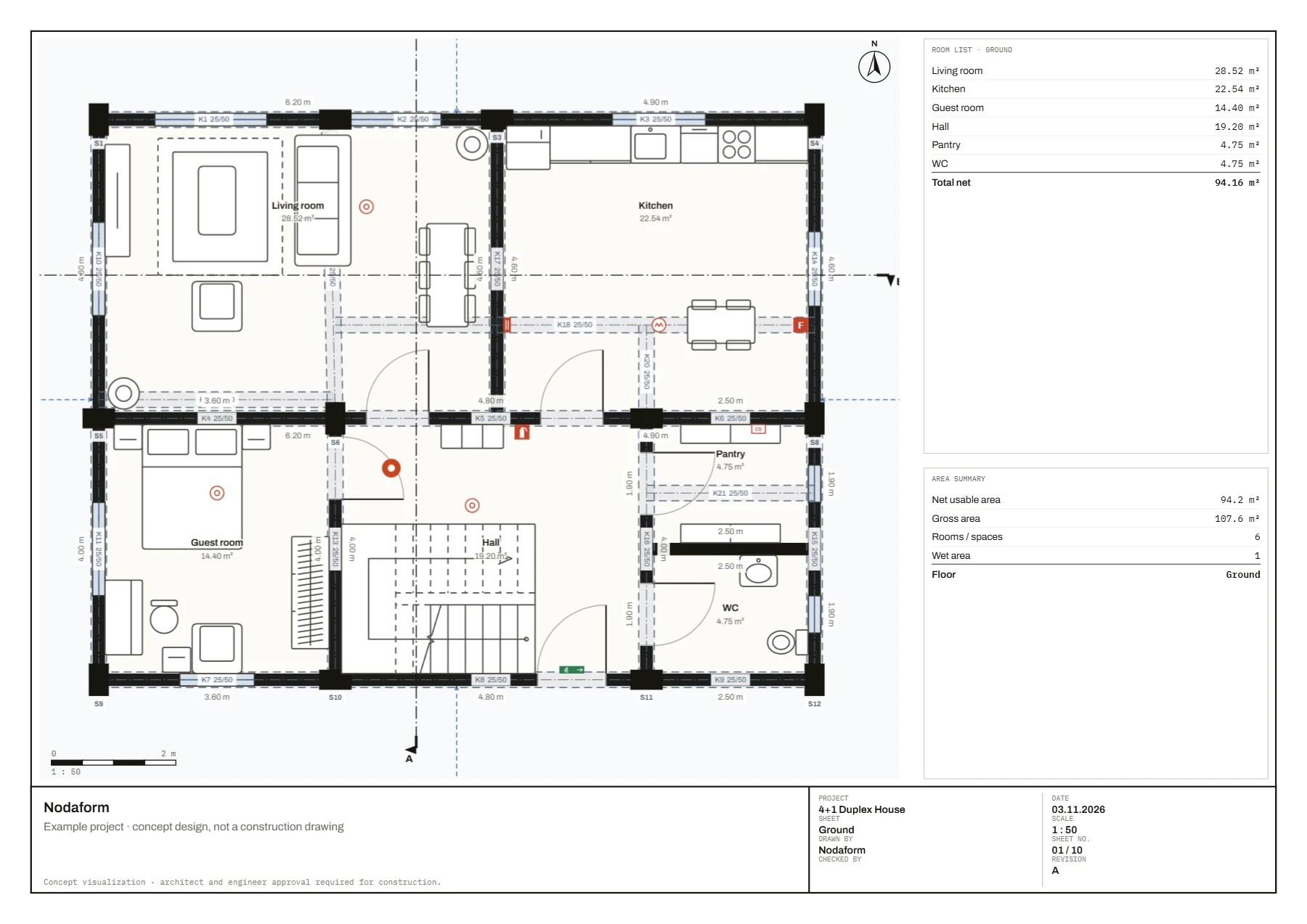
Features described on the site exist in the editor; we don't claim something exists when it doesn't, and we don't make time promises like “in 10 minutes”. For example, shared editing exists (Editor access, Pro) but live cursors don't, and the pages say so. The duplex in the example project was drawn with the editor's own tools, and the images are the editor's output.
Dimensions first
You type a room's interior dimensions and the walls are added outside; furniture is to the centimeter. In a new project, doors are 100 cm (90 cm clear opening), in line with the Turkish building regulation.
Checks inform
The structural, fire, accessibility and voltage checks are there to help you spot mistakes early. They don't replace approval by a licensed architect and engineer.
Privacy
Meta Pixel, Google Analytics and Google Ads load only if you click “Accept” on the cookie banner; if you click “Essential only”, they never load. There are no ads from other companies in the editor. Fonts come from our own server; opening a page sends no request to Google Fonts.
What stays free
A free account doesn't ask for payment details; the Free plan includes 5 saved projects, 3D of a single floor and 70 free objects. The accessibility check (turning space, door clear opening, ramps) and the accessible living objects are free on every plan; we keep them open as a matter of social responsibility.
Cancel anytime
You can cancel your subscription anytime and keep using it until the end of the period you paid for. Even when a plan ends, your projects aren't deleted; those over the limit open read-only.
Get to know Nodaform
Frequently asked questions about Nodaform
Who runs Nodaform?
Nodaform is run as a sole proprietorship. The details of the person who provides the service and is the controller of your personal data are in the KVKK Privacy Notice and the Terms of Use. For any issue, you can write to info@nodaform.com.
Where is my data stored?
Your account, projects, shares and comments are stored on our servers on Cloudflare infrastructure; your browser keeps only temporary copies for faster loading, plus your preferences. Only the person who signs in with the email address you invited can open your plan. When you delete your account, your projects and shares are deleted too.
Who sends my invoice?
Paddle. Paddle is the seller for all orders (Merchant of Record): it collects the payment, issues the invoice and handles refunds. Your card details stay with Paddle; Nodaform neither sees nor stores them. On a business account, if you enter your company details, your company appears on the invoice.
Do Nodaform's checks replace official approval?
No. The structural pre-check, fire safety, accessible design and voltage calculations give you information so you can spot mistakes early while drawing. Construction documents require approval by a licensed architect and engineer.
How do I contact Nodaform?
Write to info@nodaform.com or use the options on the Contact page. If you have an account, you can open a ticket from My account › Support, or write to us with the “Report a bug” button in the editor's top bar; you're notified by email when a reply arrives.